50 x  =
=
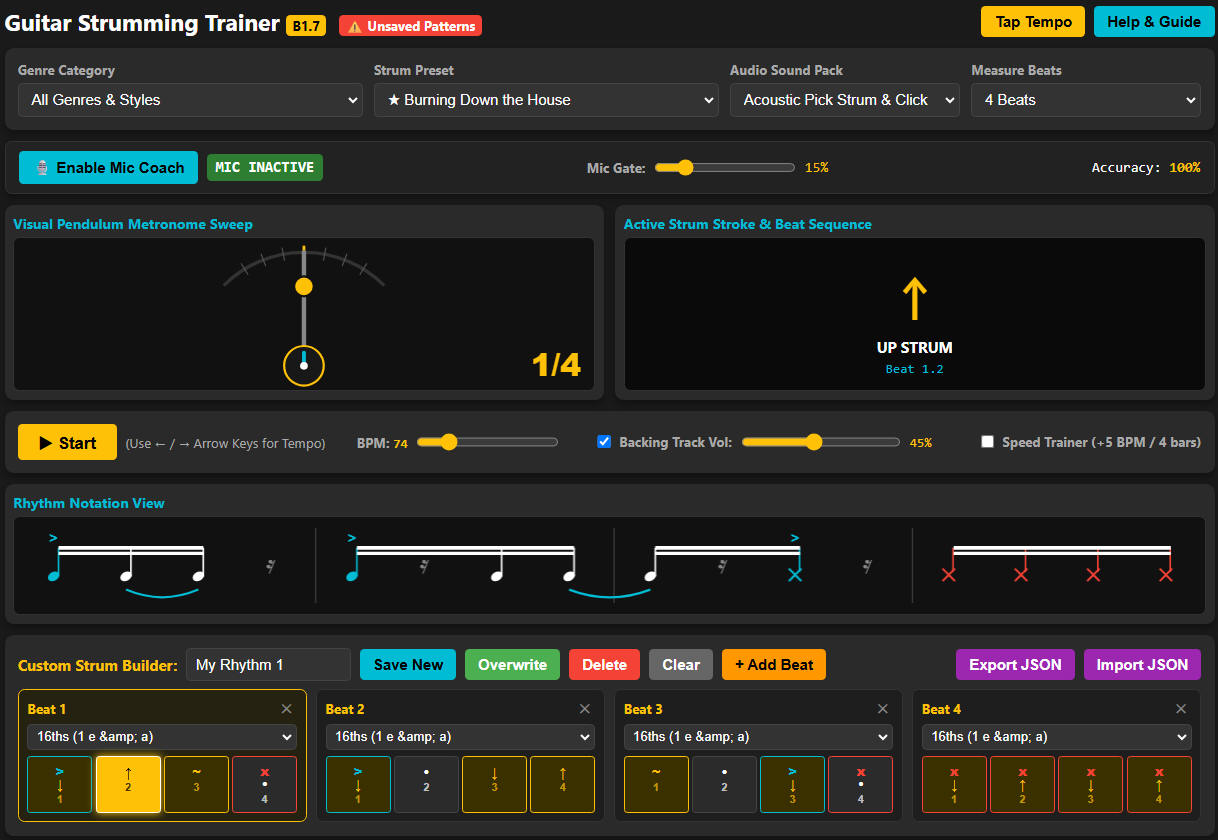
Guitar Strum Trainer (beta version)
Interactive tool that teaches a variety of strumming patterns. Easily create and save new strum patterns with any number of measures. Adjust speed to match your skill level. Experimental new capability that listens to your strumming and informs you if you are missing the pattern, rushing or dragging.
USAGE: Pick a rhythm from the preset list of songs or add your own custom rhythm. Set the tempo to a speed you are comfortable with and select Start. Use the metronome graphic to keep track of time, or follow the strumming pattern animation at the bottom of the screen. Use the Speed Trainer to increase the speed automatically every four bars if you are trying improve
your speed. The Rhythm Coach is a new capability that listens to your playing and let's you know if you are missing beats, dragging or rushing. You'll need to give it access to your microphone to do this.
CUSTOM RHYTHMS: Have a rhythm that's just kicking your butt? Add your own custom chord sequence by adding one measure at a time selecting quarter notes, eighth notes, triplets or 16th
notes. Select a stroke type (up, down, none, continued) for each note in the
measure with the left mouse button. Select an accent type (normal, accented,
palm mute) for each note with the right button. Rock beats often have four measures of quarter notes. Waltzes and some
country songs have three measures of quarter notes. Even create 5/4, 5/8 or 7/8 rhythms (see Schism, YYZ, Take Five, March of the Pigs and 15 Step).
NOTES: The Rhythm Coach listening feature is still in early stages as it is difficult to separate the guitar sound from the computer speaker sound. Try adjusting the sensitivity or wearing a computer headset to separate them.
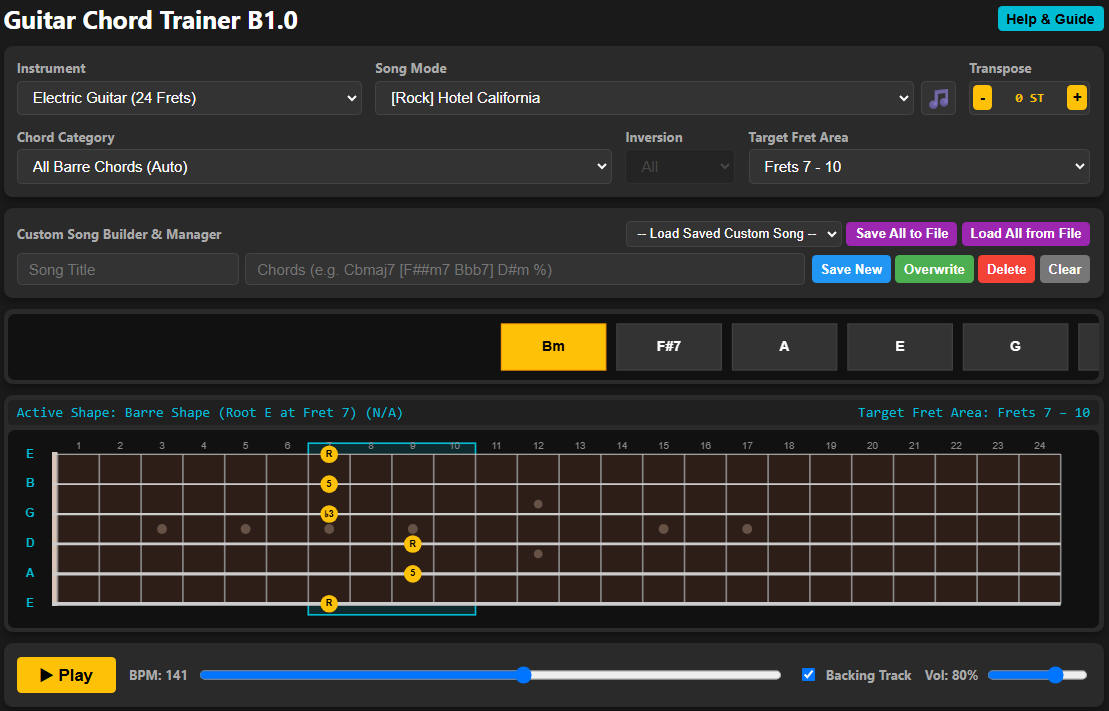
Guitar Chord Trainer (beta version)
Interactive tool that teaches triads, triad inversions, open chords, barre
chords, root chords and jazz shell chords across the fret board.
Configure your preferred string sets, inversions and target frets. Select
from a series of Blues, Rock, Metal, Funk, Jazz, and Random chord sequences or
create and save your own. The chord sequence notes scroll across the
screen at your preferred speed. The triad or triad inversion is played
through your speakers along with simple drum and bass tracks. The random
chord sequences generate a series of major, minor and 7 chords so you can
practice reacting quickly to unexpected chord changes.
USAGE: Select your preferred instrument (acoustic, electric, bass, ukulele) and
pick a chord sequence from the preset song list, random sequences options
or custom sequences. Select a preferred inversion set if applicable. Pick
a target fret area and the tool will try to keep all generated chords and
fingerings in that area. (Target frets may not apply if you select open chords,
root chords, or single inversion options.) Hit play to get started.
CUSTOM SEQUENCES: To create a new chord sequence, add measures as needed by entering chord names such as A, Bm, Cb-, D7, Emin7, Fb5b7, Gdim, Asus4, Badd4, C6, Dm6, etc. Enter '%' to repeat a measure or note. Enter '-' to extend the prior note. Enter '.' for a rest or muted notes. Enter 'X' for a palm muted note. To enter multiple notes in a single measure, enter all of the notes between square brackets, e.g. [A % Cm Dm], [F Em G], [Cdim7 . . G-], [D X X X].
NOTE: Be sure to save your custom chord sequences to a file occasionally. They are only saved in your browser until you do. If you change browsers or clear your cache, you'll lose any you haven't saved.
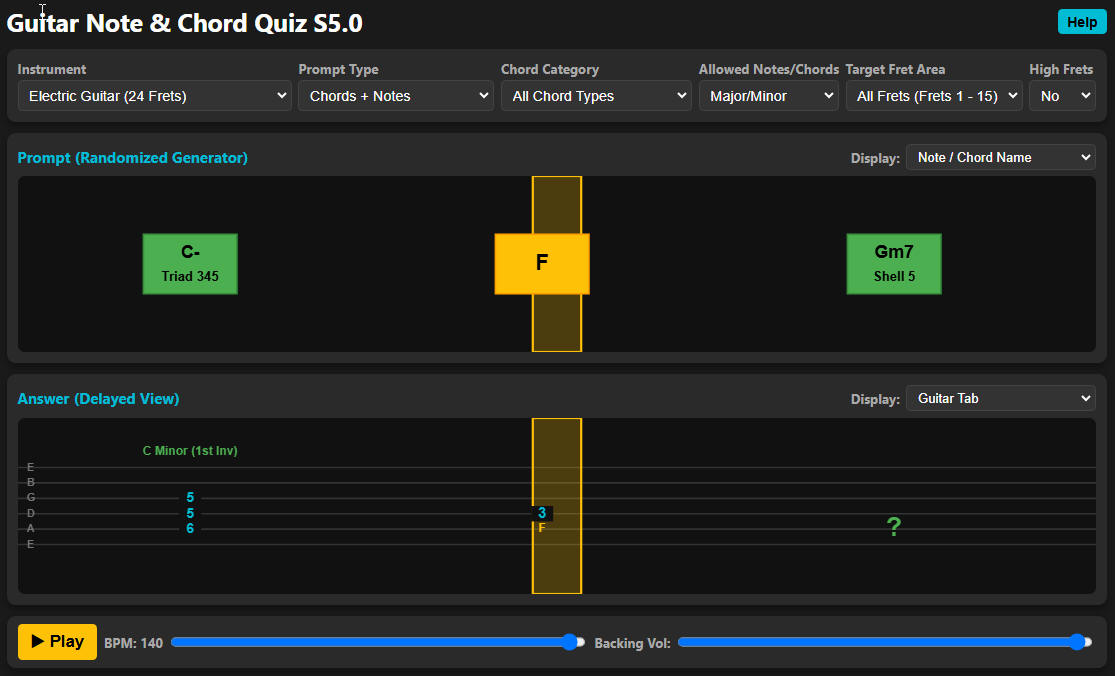
Guitar Chord & Note Quiz (beta version)
Interactive tool that challenges you to identify chords and
notes by chord name, guitar tab and traditional music notation. Split
windows show the notes or chords scrolling from right to left in the upper
window in your choice of display format (Note Name, Guitar Tab, Traditional
Music Notation). The lower windows shows question marks until the note or
chords is played and then identifies it as it scrolls left in an alternate
format.
USAGE: Choose your preferred instrument (acoustic, electric, bass, ukulele) and
select a random set of notes, chords, or chords and notes. Use the pull
downs to target in on specific note types, chord types, fret zones, or string
sets. Random notes or chords will scroll by in the top window in note name,
traditional music notation or guitar. Try play your best guess. The
answer will be displayed as they are played in the lower window in your choice
of formats too. Set the speed to match your skill level. Refer to the HELP
guide in the upper right for more information.
NOTES:
1. These tools have been tested in Google Chrome and Microsoft Edge
on a Windows 11 computer.
They should work on Apple
Safari, but have not been tested yet.
2. These tools are not formatted for smart phones. They might work,
but will probably be clumsy.
3. I'm still making lot of changes to the tools, so custom rhythms
or chord progressions stored
to a .json file may
not work correctly or even crash the tool when loaded into a future version.
4. If you find any issues or would like to see additional features,
please send a message to Slacker
in the SilverSound
Discord Server.
IF YOU FIND ANY BUGS OR CLUMSY CHORD FINGERINGS IN THESE TOOLS, PLEASE DIRECT MESSAGE Slacker IN THE SILVERSOUND DISCORD SERVER. SUGGESTIONS WELCOME!